Java Basics
JDK vs JRE vs JVM in Java
JDK, JRE, and JVM describe different layers of the Java platform. The JDK supplies development tools, a runtime environment supplies what an application needs to run, and the JVM loads and executes compiled Java bytecode. Understanding their relationship makes Java installation, compilation, execution, and troubleshooting much easier.
Quick answer
What is the difference between JDK, JRE, and JVM?
The JDK is used to develop Java programs and includes tools such as
javac. A Java runtime environment provides the libraries and
runtime components needed to run an application. The JVM is the virtual
machine inside that runtime which loads, verifies, and executes Java bytecode.
What you will learn
- The purpose of the JDK, JRE, and JVM.
- How Java source code travels from
.javato execution. - How the principal JVM components work together.
- How the interpreter, JIT compiler, and garbage collector affect execution.
- Which Java component a developer or application user needs.
Before you begin
You should know that Java source files use the .java extension and are
compiled into .class files containing bytecode. Review
Introduction to Java if these terms are new.
How JDK, JRE, and JVM are related
These terms are related, but they are not interchangeable. A beginner-friendly model is:
- JDK: the complete development kit.
- Runtime environment: the JVM plus modules, libraries, and supporting runtime files.
- JVM: the execution engine for Java bytecode.
Modern Java terminology
The conceptual relationship remains useful, but modern JDK distributions do not always ship or advertise a separate general-purpose JRE package. Developers normally install a JDK, while application vendors can create or bundle an appropriate runtime image for their applications.
What is the Java Development Kit (JDK)?
The JDK is the software package used to create Java applications. It includes the compiler, launcher, documentation tools, packaging tools, diagnostic utilities, and the runtime components required to execute the programs being developed.
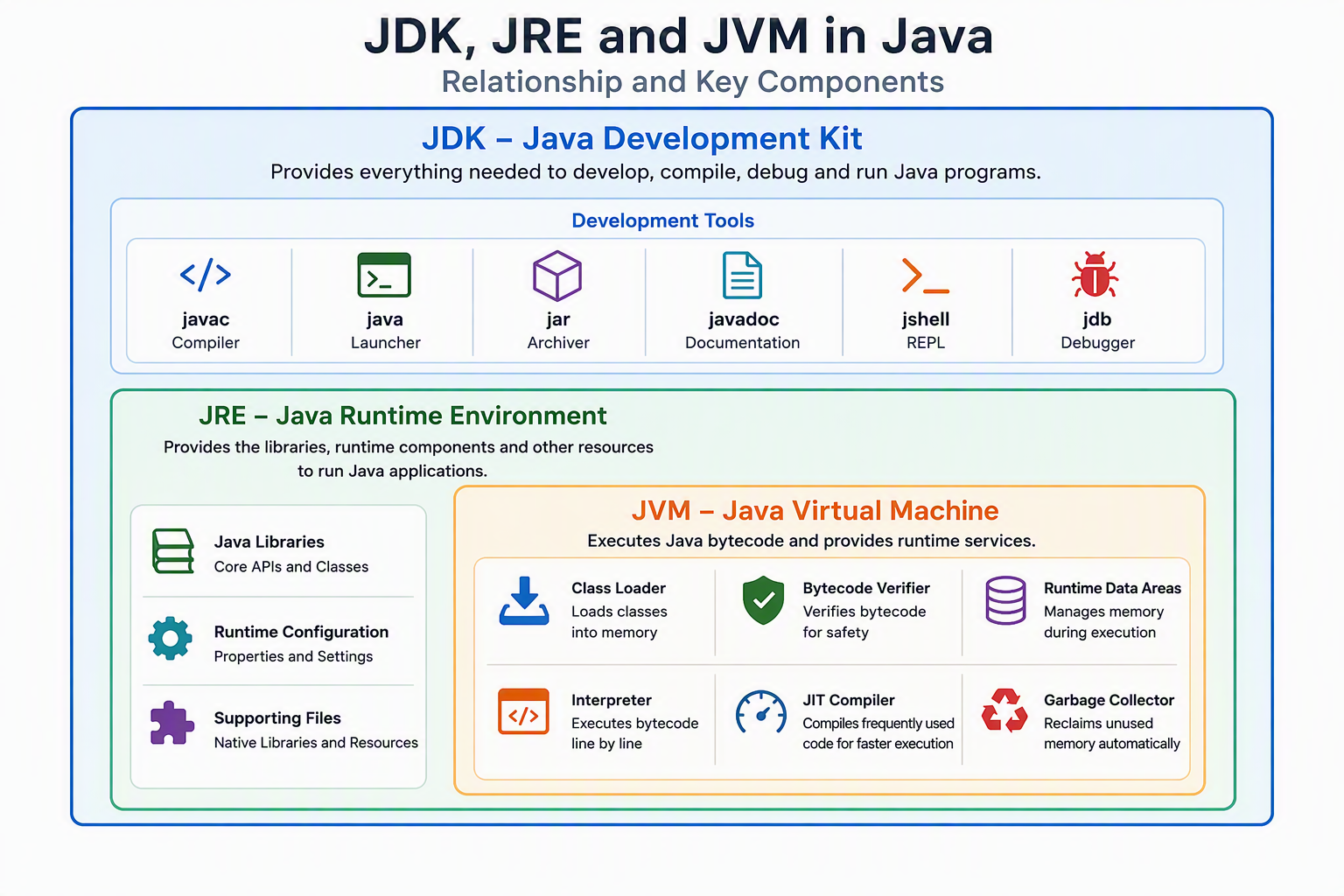
Important JDK tools
| Tool | Purpose |
|---|---|
javac | Compiles Java source code into bytecode. |
java | Starts a Java application on the JVM. |
jar | Creates, lists, and extracts JAR archives. |
javadoc | Generates API documentation from source comments. |
jshell | Provides an interactive environment for trying Java statements. |
jdb | Provides command-line debugging facilities. |
Choose the JDK when: you want to write, compile, test, package, or debug Java code.
What is the Java Runtime Environment (JRE)?
A Java Runtime Environment is the environment needed to run a Java application. Conceptually, it combines a JVM with the standard Java libraries, modules, configuration, and supporting files used during execution. It does not provide the complete development toolset associated with a JDK.
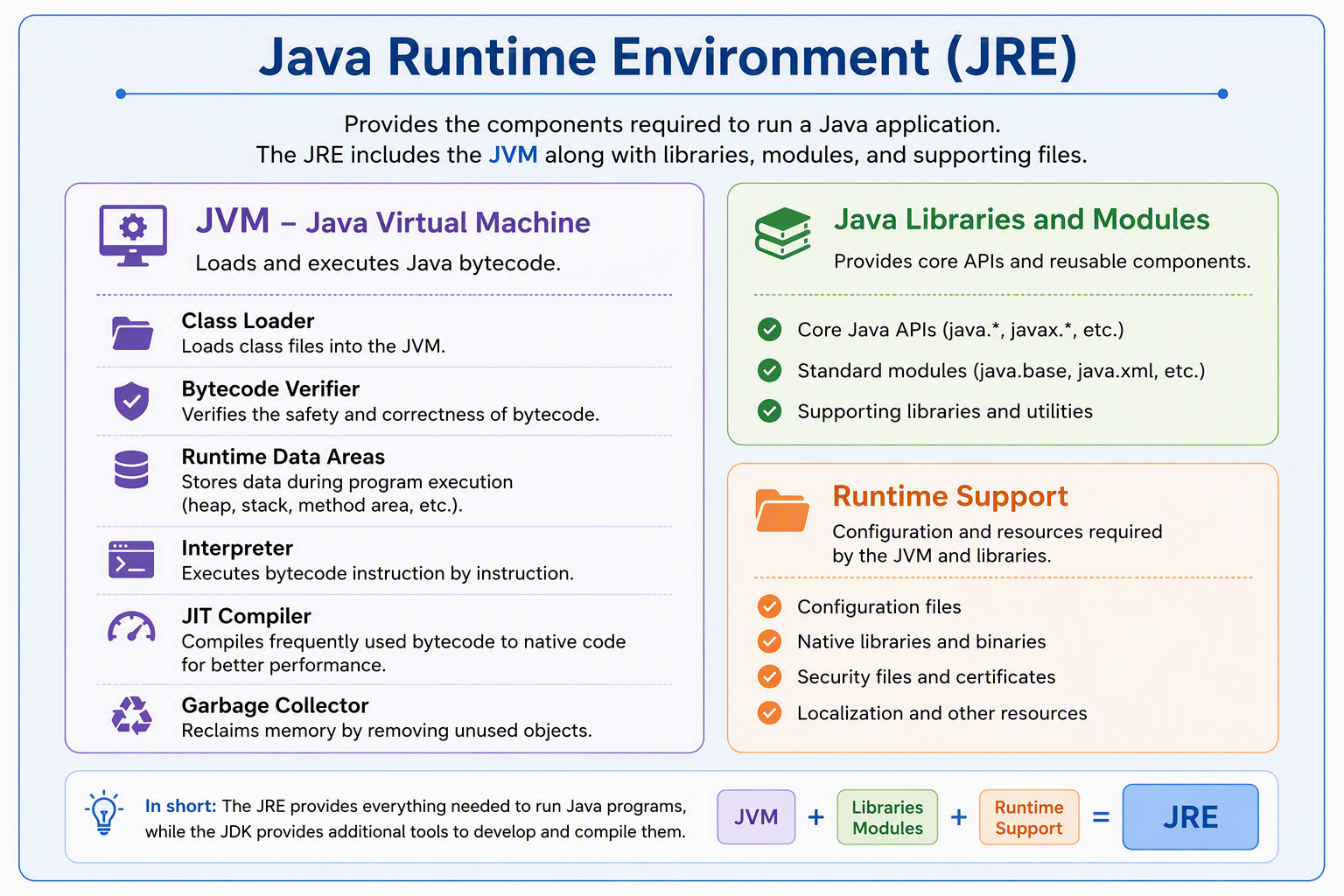
A runtime environment contains
- A JVM implementation.
- Java platform classes and modules required by the application.
- Runtime configuration and native supporting libraries.
What should a beginner install?
Install a JDK for this tutorial because you need both javac to compile code and
java to run it. A runtime-only environment cannot compile your source files.
What is the Java Virtual Machine (JVM)?
The JVM is an abstract machine defined by a specification and implemented for particular operating systems and processor architectures. It loads class files, verifies their bytecode, manages runtime memory, executes instructions, and cooperates with native platform services.
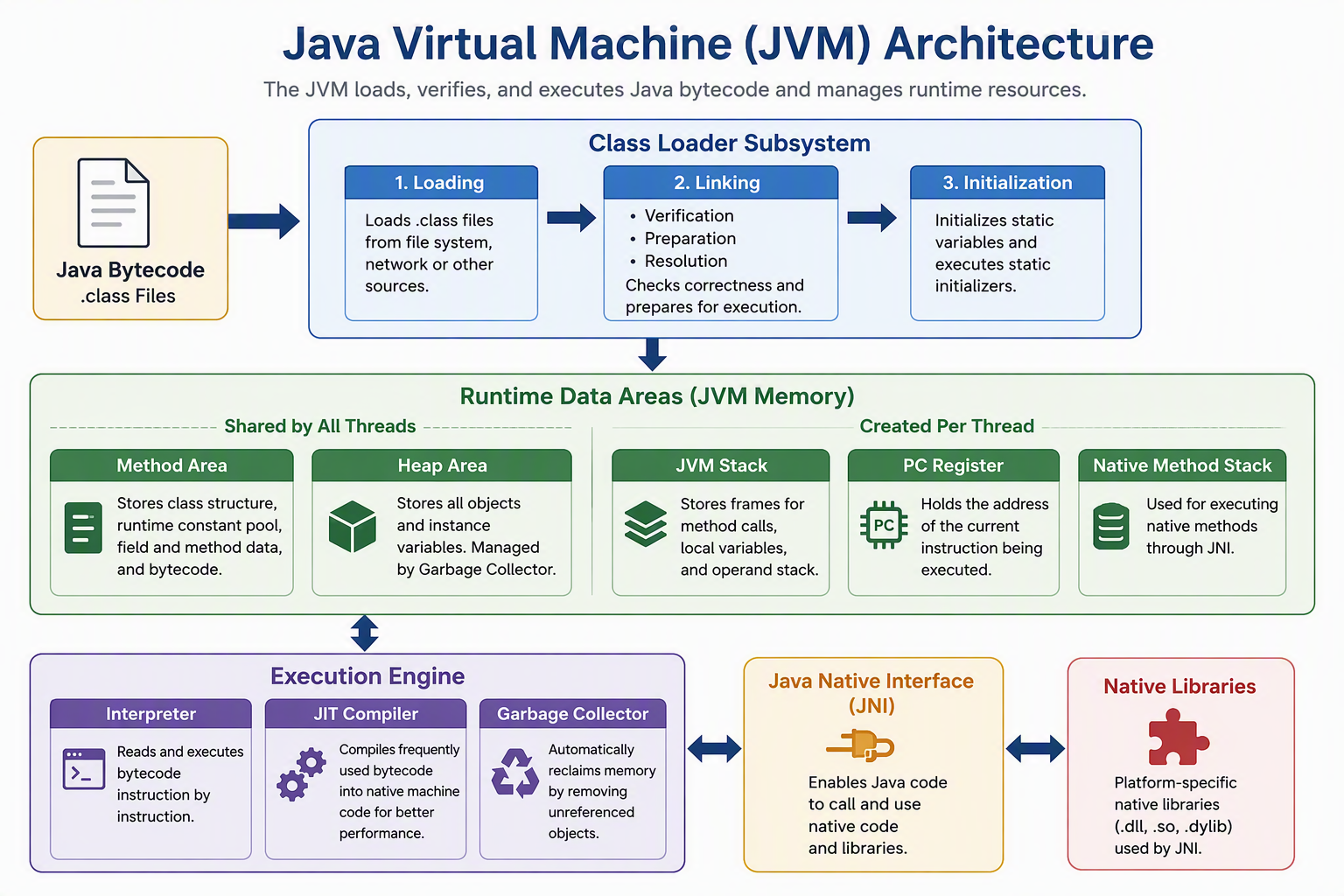
- The JVM executes compiled Java bytecode.
- The bytecode format is designed for portability.
- The JVM implementation is platform-specific.
- A compatible JVM lets the same bytecode run on different supported systems.
Difference between JDK, JRE, and JVM
| Feature | JDK | JRE / runtime | JVM |
|---|---|---|---|
| Full form | Java Development Kit | Java Runtime Environment | Java Virtual Machine |
| Main purpose | Develop, compile, package, and run | Provide the environment to run applications | Load and execute bytecode |
| Primary users | Java developers | Applications and end users | Used internally by the runtime |
| Contains | Development tools plus runtime components | JVM plus required libraries/modules | Execution and runtime-memory machinery |
| Can compile? | Yes, with javac | No complete compiler toolset | No; it executes bytecode |
| Platform-specific? | Yes | Yes | Yes |
How a Java program moves through the platform
- You write source code in a
.javafile. - The JDK compiler,
javac, compiles it into a.classfile. - The
javalauncher starts a JVM and requests the main class. - The class-loading subsystem loads the required classes.
- The verifier checks the bytecode before execution.
- The execution engine interprets or compiles bytecode into native instructions.
JVM architecture and working
A JVM implementation contains several cooperating subsystems. The following model is sufficient for understanding normal Java program execution.
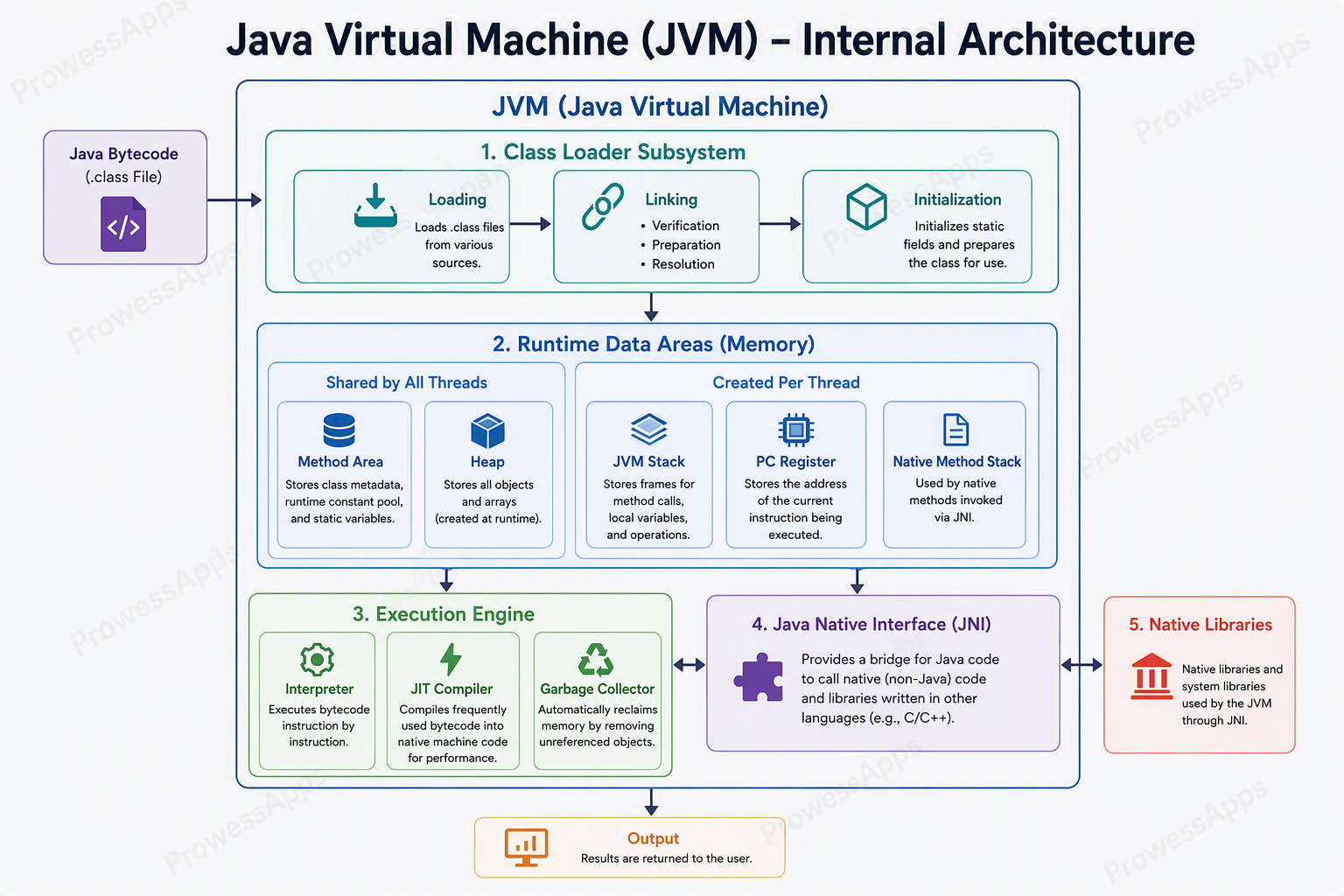
1. Class-loading subsystem
The class-loading process has three broad stages:
- Loading: locates class data and creates the JVM representation of the class.
- Linking: verifies bytecode, prepares storage, and resolves symbolic references when required.
- Initialization: runs class initialization logic and assigns explicit static values.
2. Runtime data areas
| Area | Purpose | Sharing |
|---|---|---|
| Heap | Stores objects and arrays. | Shared by JVM threads. |
| Method area | Stores per-class structures such as runtime constant pools, field and method data, and method code. | Shared by JVM threads. |
| Java stack | Stores frames for method calls, local variables, and intermediate calculations. | One per thread. |
| PC register | Tracks the current JVM instruction for a non-native method. | One per thread. |
| Native method stack | Supports native methods where required by the implementation. | Normally associated with a thread. |
3. Execution engine
- Interpreter: begins executing bytecode instructions without waiting for full native compilation.
- JIT compiler: compiles selected frequently executed code into optimized native machine code.
- Garbage collector: reclaims heap memory occupied by objects that are no longer reachable.
4. JNI and native libraries
The Java Native Interface (JNI) allows Java code to interact with native code when an application or library requires platform-specific functionality. Native code reduces portability and should be used deliberately rather than as the normal execution path.
How the JIT compiler improves performance
Interpreting bytecode is useful for quick startup, but repeatedly interpreting frequently executed methods can be inefficient. A Just-In-Time compiler uses runtime information to identify valuable compilation candidates and converts them into native machine code. Later executions can use the compiled version, and the JVM may recompile code when newer profiling information enables better optimization.
Without JIT:
Bytecode → Interpret repeatedly → More execution overhead

With JIT:
Bytecode → Profile hot code → Compile to native code → Reuse optimized code
JIT is not the same as javac
javac is a JDK tool that converts source code into bytecode before the application runs.
The JIT compiler operates inside a running JVM and converts selected bytecode into native machine code.
Practical JDK and JVM commands
Use these commands after installing a JDK:
java -version
javac -version
javac Main.java
java Main
java -versiondisplays information about the Java launcher and runtime.javac -versionconfirms that the Java compiler is installed.javac Main.javacompiles the source file.java Mainstarts the class namedMain; do not include.class.
Common beginner mistakes
- Calling the JDK, JRE, and JVM three different programming languages.
- Expecting a runtime-only installation to provide the
javaccompiler. - Saying that the JVM itself is platform-independent; JVM implementations are built for particular platforms.
- Confusing source compilation by
javacwith runtime JIT compilation. - Assuming that every modern Java vendor distributes a separate general-purpose JRE download.
“The JVM compiles my .java source file with javac.”
“The JDK’s javac tool creates bytecode, and the JVM executes that bytecode.”
What’s next?
Continue with Java Environment Setup
to install a JDK, configure your system, and verify the java and javac commands.
Lesson summary
- The JDK provides the tools used to develop, compile, package, debug, and run Java applications.
- A Java runtime environment provides the JVM and supporting modules and libraries required during execution.
- The JVM loads, verifies, manages, and executes Java bytecode.
- Java bytecode is portable, while a JVM implementation is platform-specific.
- The interpreter begins execution, and the JIT compiler can optimize frequently executed code.
- For this tutorial, install a JDK because it includes both development and runtime capabilities.
Frequently asked questions
What is the JVM?
JVM (Java Virtual Machine) is a virtual machine that resides in the computer memory. It loads, verifies, and executes Java bytecode line by line.
Is JVM platform independent?
No, JVM is platform-dependent. Every operating system (Windows, Mac, Linux) has its own specific JVM implementation, which enables the "Write Once, Run Anywhere" concept.
What is JRE?
JRE (Java Runtime Environment) is a software package that contains the JVM along with Java class libraries and other files needed to run Java applications.
Do I need JDK just to run a Java program?
No, if you only want to run a pre-compiled Java application on your machine, you only need the JRE, not the JDK.
What is the JDK?
JDK (Java Development Kit) is a full software development environment that includes everything in the JRE, plus development tools like the compiler (javac) and debugger.
What is the JIT compiler?
The Just-In-Time (JIT) compiler is part of the JVM. It improves execution speed by compiling frequently executed bytecode (hotspots) into native machine code at runtime.
Check your knowledge
Free learner features
Save your learning progress
Sign in to mark lessons as completed, save your Java learning progress across devices, and participate in lesson discussions.
Sign in to track progressDiscussion
Ask questions, share suggestions, or discuss this lesson.
No approved comments yet. Start the discussion by asking a helpful question.
