Java Basics
Introduction to Java Programming
Java is a high-level, class-based programming language used to build backend services, enterprise software, desktop applications, development tools, and Android-related applications. This lesson explains how Java source code becomes bytecode and how the Java Virtual Machine (JVM) runs it.
Quick answer
What is Java?
Java is a high-level, strongly typed, class-based programming language. A Java compiler converts source code into bytecode, and a compatible JVM loads and executes that bytecode. This design allows the same compiled program to run across supported platforms without recompiling it separately for each operating system.
What you will learn
- What Java is and where it is commonly used.
- How source code, bytecode, and the JVM work together.
- How to read and run a small Java program.
Before you begin
No previous programming experience is required. Basic computer knowledge is enough to start.
What is Java programming?
Java is a programming language used to write instructions that a computer can execute. Java uses static types, classes, methods, automatic memory management, and exception handling to help developers create structured and maintainable applications.
A simple way to understand Java
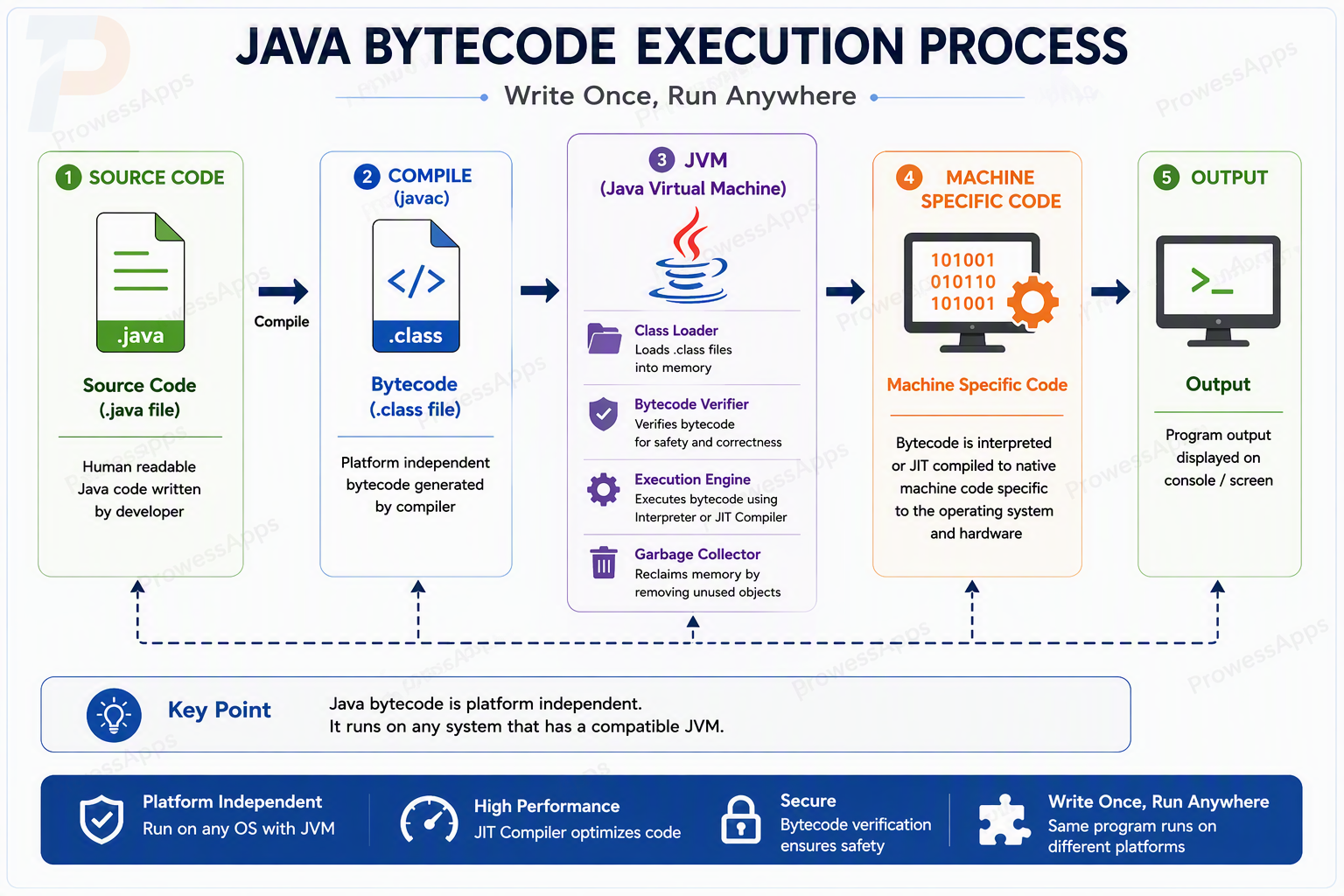
Java bytecode is an intermediate set of instructions. Instead of producing a separate program directly for every operating system, the compiler produces bytecode that a compatible JVM can run.
How does Java work?
- You write source code in a
.javafile. - The Java compiler,
javac, checks the code and creates bytecode in a.classfile. - The JVM loads, verifies, and executes the bytecode on the computer.
Your first Java program
The following program prints a message to the console.
public class HelloJava {
    public static void main(String[] args) {
        System.out.println("Hello, Java!");
    }
}
Output
Hello, Java!How the program works
-
public class HelloJavadeclares a class namedHelloJava. In a traditional Java source file, executable methods and fields are declared inside a class. -
public static void main(String[] args)is the entry point used to start this program:public: The method is accessible to the Java launcher.static: The JVM can invokemain()without first creating aHelloJavaobject.void: The method does not return a value.main: The conventional entry-point method name used by the Java launcher.String[] args: An array containing command-line arguments passed when the program starts.
System.out.println()prints text followed by a new line.
Brief history of Java
Java emerged from Sun Microsystems’ Green Project in 1991. The development team was led by James Gosling and initially focused on portable software for consumer electronic devices.
The language was known as Oak during early development. It was later renamed Java after trademark concerns with the Oak name.
Java was publicly introduced in 1995, and JDK 1.0 was released in January 1996.
Why learn Java?
- Beginner-friendly: clean, readable C-style syntax with no manual memory management.
- High demand: consistently among the top languages requested by software employers worldwide.
- Enterprise standard: the backbone of banking, e-commerce, and large-scale backend systems.
- Strong OOP foundation: teaches object-oriented thinking that transfers to many other languages.
- Huge ecosystem: mature libraries, frameworks (Spring, Hibernate), tooling, and a vast community.
Where is Java used?
- Backend services and enterprise applications
- Banking, payment, and transaction-processing systems
- Android-related applications and shared mobile libraries
- Desktop tools, IDEs, build systems, and developer utilities
- Cloud services, messaging systems, and distributed applications
Java and websites
Java can run on a web server and handle application logic, data processing, and APIs. The interface displayed inside a standard web browser is normally built with HTML, CSS, and JavaScript, while Java may operate behind it on the server.
Java Editions
Java is packaged into different editions, each targeting a specific type of application:
| Edition | Full Name | Best For |
|---|---|---|
| Java SE | Standard Edition | Core language features for desktop and server applications. |
| Jakarta EE | Enterprise Edition (formerly Java EE) | Large-scale web and enterprise applications; now under the Eclipse Foundation. |
| Java ME | Micro Edition | Mobile, embedded, and resource-constrained devices. |
| Java Card | Java Card | Smart cards and secure embedded devices. |
Common beginner mistakes
- The public class name and filename do not match.
- Opening and closing curly braces do not match.
- A semicolon is missing at the end of a statement.
- Uppercase and lowercase letters are treated as interchangeable even though Java is case-sensitive.
System.out.println("Hello")System.out.println("Hello");What’s next?
Continue with Features of Java to understand the language characteristics that support portability, maintainability, and application development.
Lesson summary
- Java source code is compiled into bytecode.
- A compatible JVM loads and executes Java bytecode.
- Java is used for backend, enterprise, desktop, Android-related, and cloud applications.
- A traditional Java program starts from a
main()method.
Frequently asked questions
What is Java?
Java is a high-level, strongly typed, class-based programming language used for backend services, enterprise applications, desktop software, developer tools, and Android-related applications.
What is a JVM?
A Java Virtual Machine, or JVM, is a runtime environment that loads, verifies, and executes compiled Java bytecode.
Why is Java platform independent?
Java source code is compiled into bytecode. The same bytecode can run on supported operating systems and hardware platforms that provide a compatible JVM.
Check your knowledge
Free learner features
Save your learning progress
Sign in to mark lessons as completed, save your Java learning progress across devices, and participate in lesson discussions.
Sign in to track progressDiscussion
Ask questions, share suggestions, or discuss this lesson.
No approved comments yet. Start the discussion by asking a helpful question.
