Java Basics
Comments in Java
Comments explain the intent of source code, improve readability, and help developers maintain programs. Java supports single-line, multi-line, and Javadoc comments. Comment text is ignored during normal compilation and does not become an executable statement.
Quick answer
What are comments in Java?
Java comments are explanatory text placed in source code. Use // for a single-line
comment, /* ... */ for a block comment, and /** ... */ for a Javadoc
comment that can be processed by the javadoc tool.
What you will learn
- The purpose of comments in Java source code.
- How to write single-line and multi-line comments.
- How Javadoc comments document classes and methods.
- How to generate API documentation with the
javadoccommand. - When comments improve code and when comments become unnecessary.
Before you begin
Review First Java Program so that classes, methods, and statements are familiar. The examples can be opened in the ProwessApps Coding Ground with the Try buttons.
Why are comments used in Java?
Comments communicate information that is useful to a person reading the code. A good comment explains intent, a non-obvious decision, an assumption, or the public contract of an API.
- Explain why a particular approach was chosen.
- Describe complex logic or an important constraint.
- Document public classes, methods, parameters, return values, and exceptions.
- Leave focused maintenance notes when appropriate.
Comments do not replace readable code
Clear names and small, focused methods should make most code understandable. Comments are most valuable when they add context that the code itself cannot express clearly.
Types of comments in Java
| Comment type | Syntax | Typical use |
|---|---|---|
| Single-line | // comment | A short note that continues to the end of the current line. |
| Multi-line or block | /* comment */ | A longer explanation that can span several lines. |
| Documentation or Javadoc | /** comment */ | Structured API documentation for declarations. |
Single-line comments
A single-line comment begins with //. Everything from // to the end of
that line is comment text.
// This program displays a greeting
public class SingleLineComment {
    public static void main(String[] args) {
        System.out.println("Hello World"); // Print the message
    }
}
Output
Hello World
The first comment occupies a complete line. The second comment follows a statement and explains
that statement. Both forms use the same // syntax.
Multi-line comments
A multi-line comment begins with /* and ends with */. The comment can
occupy one line or span several lines.
/*
 * This program demonstrates
 * a comment that spans multiple lines.
 */
public class MultiLineComment {
    public static void main(String[] args) {
        System.out.println("Multi-line comment example");
    }
}
Use block comments carefully
A block comment is useful for a focused explanation. Avoid keeping large obsolete code blocks inside comments; version control is a better place to preserve old implementations.
IDE shortcuts for comments
In most popular Java IDEs like IntelliJ IDEA, Eclipse, and VS Code, you can quickly toggle comments using keyboard shortcuts:
- Single-line: Highlight code and press
Ctrl + /(Windows/Linux) orCmd + /(macOS). - Multi-line: Highlight code and press
Ctrl + Shift + /(Windows/Linux) orCmd + Option + /(macOS).
Documentation comments (Javadoc)
A documentation comment begins with /** and ends with */. The
javadoc tool reads these comments to generate browsable API documentation.
/**
 * Provides basic arithmetic operations.
 *
 * @author ProwessApps
 * @version 1.0
 */
public class Calculator {

    /**
     * Adds two integer values.
     *
     * @param first the first value
     * @param second the second value
     * @return the sum of first and second
     */
    public int add(int first, int second) {
        return first + second;
    }
}
Common Javadoc tags
| Tag | Purpose |
|---|---|
@param | Documents a method or constructor parameter. |
@return | Describes the value returned by a method. |
@throws | Documents an exception a method may throw. |
@author | Identifies an author when that information is maintained. |
@version | Records version information for the documented element. |
@see | Adds a reference to related API documentation. |
Generate API documentation
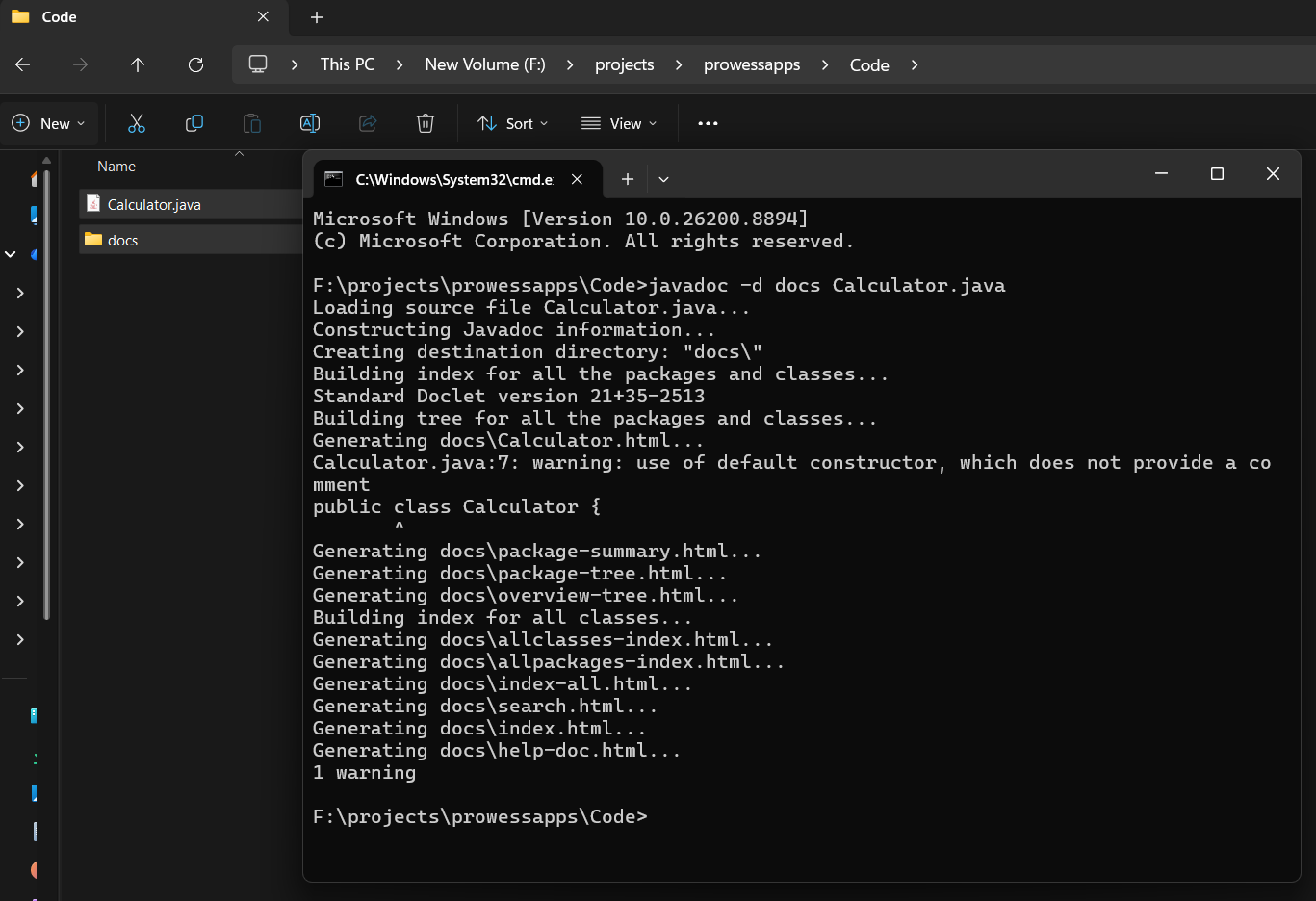
After saving the example as Calculator.java, run:
javadoc -d docs Calculator.java
The -d docs option places the generated documentation in a folder named
docs. Open the generated index.html file in a browser.
What does the output look like?
The generated index.html creates a professional webpage similar to the official Java API documentation. It includes:
- A navigation bar to easily browse packages and classes.
- A detailed view of the
Calculatorclass and its description. - Formatted tables describing the
add()method, its parameters (from@param), and its return type (from@return).
Comment best practices
- Explain intent and important decisions rather than translating each line into English.
- Keep comments accurate when the surrounding code changes.
- Use clear names first, then add comments where context is still needed.
- Keep comments concise and close to the code they describe.
- Use Javadoc for public APIs that other developers need to understand.
- Avoid placing passwords, tokens, private data, or confidential information in comments.
// Add 1 to count
count++;// Record the successful retry.
count++;Common mistakes with Java comments
- Leaving a block comment without its closing
*/. - Trying to nest one block comment inside another block comment.
- Writing Javadoc syntax inside a method body and expecting it to document the method.
- Keeping comments that no longer match the code.
- Commenting every obvious statement instead of improving names and structure.
- Using comments to store secrets or sensitive information.
- Thinking comments are ignored before processing Unicode escapes. Since Java processes Unicode escapes first, an innocent-looking
// \u000d System.out.println("Hack");will actually execute the print statement because\u000dis parsed as a new line!
What’s next?
Continue with Java Keywords to learn the reserved words that define Java syntax and cannot be used as ordinary identifiers.
Lesson summary
- Java supports single-line, multi-line, and Javadoc comments.
- Single-line comments begin with
//. - Multi-line comments are enclosed by
/*and*/. - Javadoc comments begin with
/**and can generate API documentation. - Comments should explain intent and remain synchronized with the code.
- The
javadoctool can create HTML documentation from documentation comments.
Frequently asked questions
What are the three types of comments in Java?
Java supports single-line comments beginning with //, multi-line comments enclosed by /* and */, and Javadoc comments enclosed by /** and */.
Do comments affect Java program execution?
Comment text is ignored during normal compilation and does not become an executable statement. Comments can still be processed by tools such as javadoc.
What is the difference between a multi-line comment and a Javadoc comment?
A multi-line comment is a general block comment beginning with /*. A Javadoc comment begins with /** and is associated with a declaration so documentation tools can generate API documentation.
Can Java block comments be nested?
No. Java block comments do not nest. The first closing */ terminates the comment, so placing another block comment inside it can produce unexpected code or compilation errors.
How do I generate Javadoc documentation?
Run the javadoc tool on the source file. For example, javadoc -d docs Calculator.java generates HTML documentation in the docs folder.
Should comments explain every line of Java code?
No. Comments should add useful context, intent, constraints, or API documentation. Obvious comments create noise and can become inaccurate when code changes.
Check your knowledge
Free learner features
Save your learning progress
Sign in to mark lessons as completed, save your Java learning progress across devices, and participate in lesson discussions.
Sign in to track progressDiscussion
Ask questions, share suggestions, or discuss this lesson.
No approved comments yet. Start the discussion by asking a helpful question.
